Is Steam Deck Still Worth It in 2025?
Real Performance, Compatibility & Alternatives
When Valve launched the Steam Deck in 2022, it revolutionized handheld PC gaming. By 2025, dozens of competitors have entered the scene—but the question many are asking is:
“Is the Steam Deck still worth buying today?”
With updated software, a massive verified game library, and stiff competition from devices like the ASUS ROG Ally and Lenovo Legion Go, this guide breaks down whether the Steam Deck still holds up—and who it’s best for.
Steam Deck in 2025: Quick Overview
| Feature | Steam Deck (2022) | Steam Deck (2025 – OLED Model) |
|---|---|---|
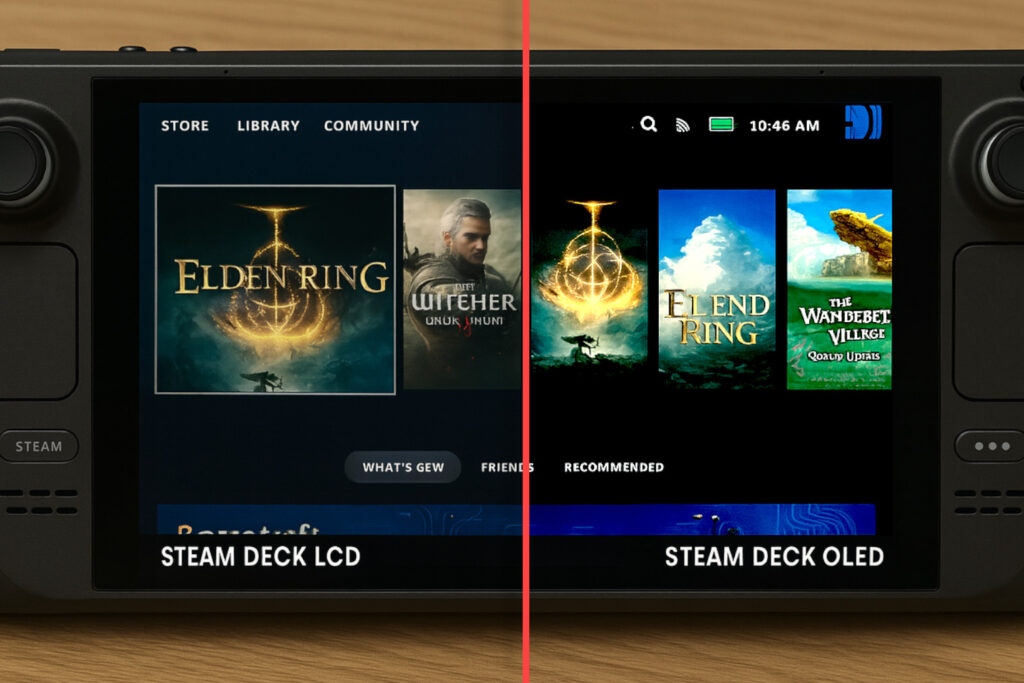
| Display | 7″ LCD, 1280×800 | 7.4″ OLED, 90Hz, HDR |
| Battery | ~2–8 hours | ~3–12 hours |
| Storage | 64GB–512GB eMMC/SSD | 256GB–1TB SSD |
| GPU/CPU | Custom AMD APU | Same, but with better firmware tuning |
| Price | $399–$649 | $549–$679 |
Summary: With the Steam Deck OLED model released in late 2023, performance and battery life have improved, but core specs remain the same.
Real-World Performance (2025 Testing)
Let’s look at how the Steam Deck handles popular games in mid-2025 using updated firmware (SteamOS 3.6+).
| Game Title | Resolution | Settings | FPS (LCD) | FPS (OLED) |
|---|---|---|---|---|
| Elden Ring | 800p | Medium | 30–35 | 35–40 |
| Cyberpunk 2077 | 720p | Low | 25–30 | 30 |
| Baldur’s Gate 3 | 800p | Medium | 40+ | 50+ |
| Hades II (Early Access) | 800p | High | 60+ | 60+ |
| Fortnite (via Heroic Launcher) | 720p | Low | 30–45 | 45–50 |
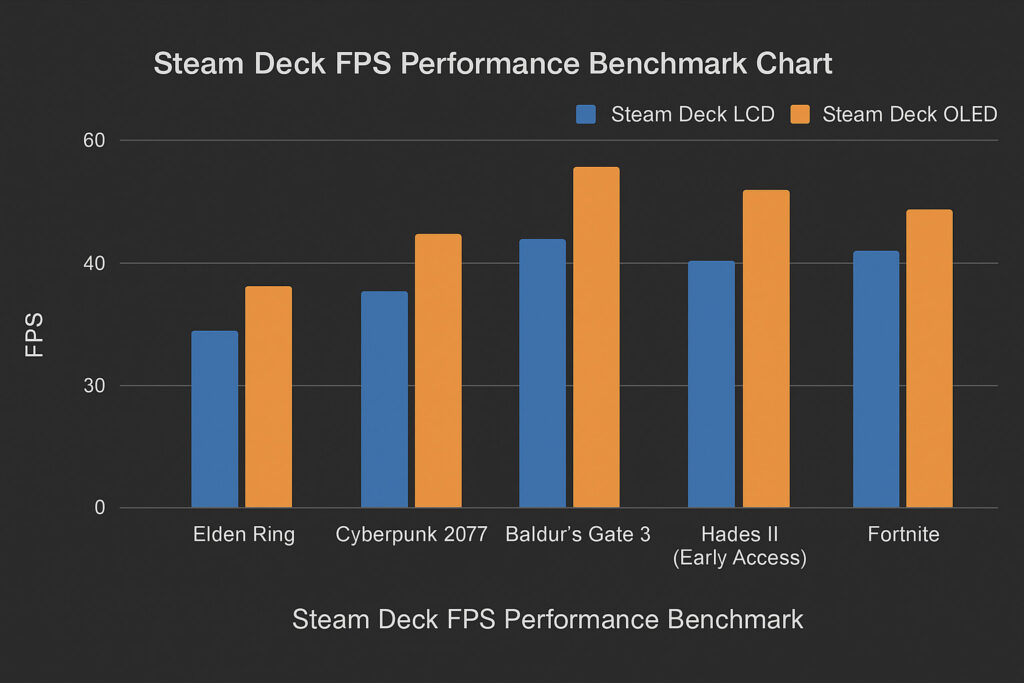
Key Takeaway: The OLED model has marginally better frame pacing and battery management, making it the better pick in 2025.
Compatibility in 2025: Is Your Library Playable?
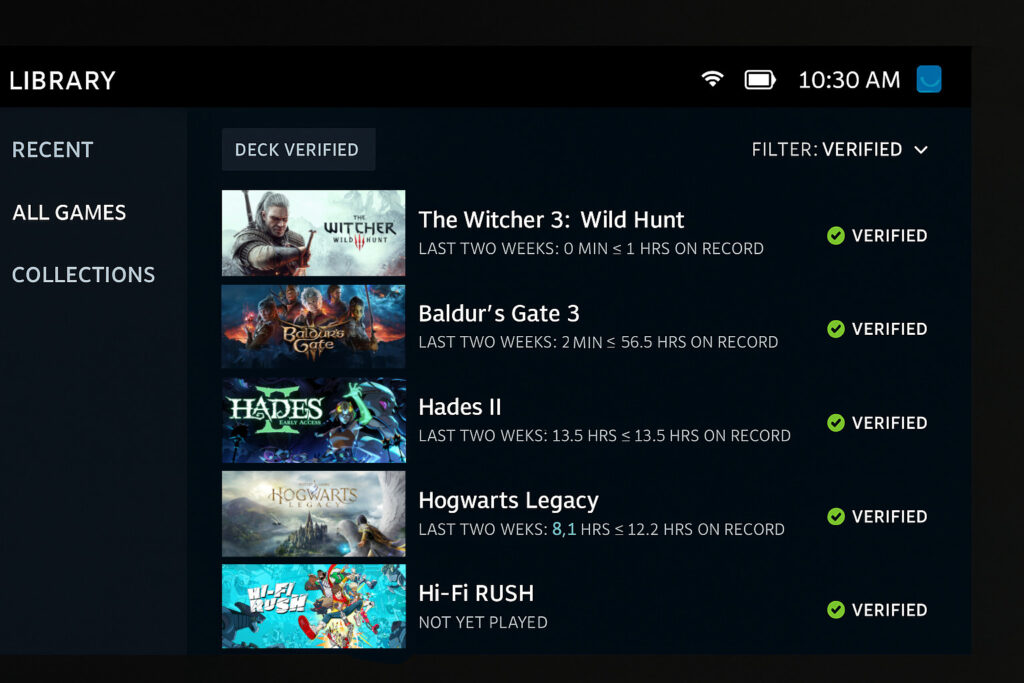
As of July 2025, Valve’s Deck Verified system reports:
- 11,000+ Verified or Playable titles
- Top Verified Games:
- The Witcher 3
- Baldur’s Gate 3
- Hades II
- Hogwarts Legacy
- Hi-Fi Rush
SteamOS Improvements:
- Faster suspend/resume
- Gamepad UI overhauls
- Smoother Proton integration for Windows-only games
You can also install Windows 11 for full Game Pass, Epic Games, and Battle.net compatibility—though this requires some tech know-how.
Battery Life: Better, But Still Varies
Steam Deck OLED Battery Test (Real Usage):
| Game | Estimated Runtime |
|---|---|
| Vampire Survivors | 6-7 hrs |
| Baldur’s Gate 3 | 5–6 hrs |
| Cyberpunk 2077 | 4-5 hrs |
| Indie platformers | 2-4 hrs |
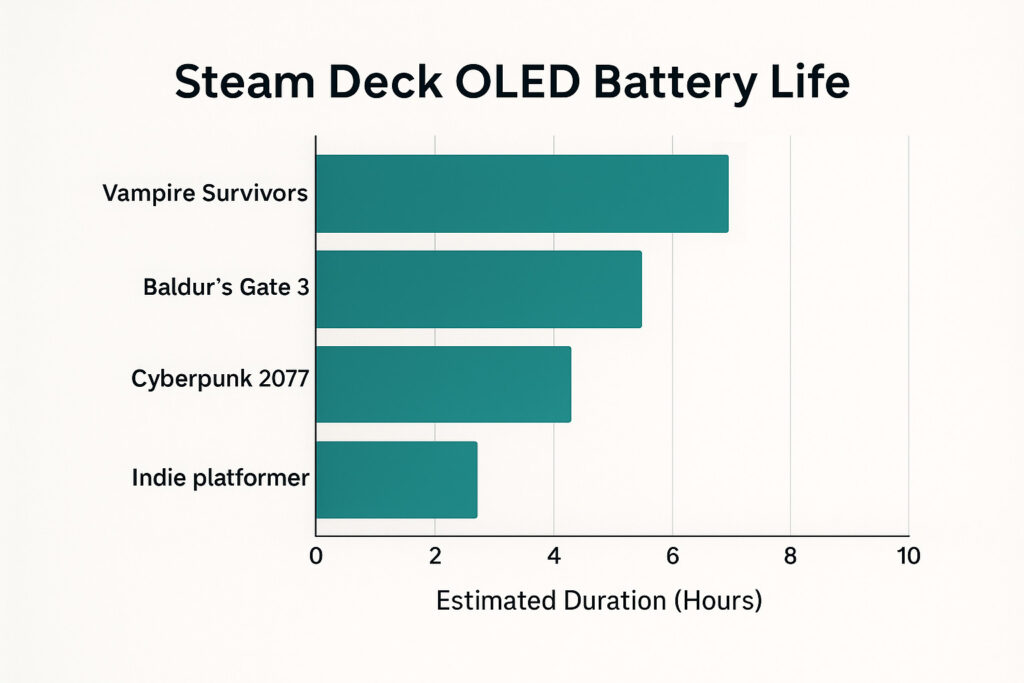
The OLED model dramatically improves efficiency on 2D/indie games and video streaming. However, AAA titles still drain battery quickly.
Steam Deck vs the Competition (2025 Edition)
1. Steam Deck OLED
- Best for: Steam users, modders, Linux fans
- Pros: Price-to-performance, great controls, community mods
- Cons: Still large/heavy, no native Game Pass support
2. ASUS ROG Ally Z2 (2025)
- Best for: Game Pass, multi-launcher users
- Specs: Ryzen Z2, 120Hz 1080p screen, Windows 11
- Pros: High refresh rate, Game Pass native, great performance
- Cons: Short battery life, Windows bloat
3. Lenovo Legion Go
- Best for: High-end Windows gaming with detachable controllers
- Pros: 144Hz display, kickstand, FPS mode
- Cons: Pricey, heavier, bulkier UI
| Feature | Steam Deck OLED | ASUS ROG Ally | Lenovo Legion Go |
|---|---|---|---|
| Display Type | OLED | IPS LCD | IPS LCD |
| Display Size | 7.4″ | 7″ | 8.8″ |
| Resolution | 1280 x 800 | 1920 x 1080 | 2560 x 1600 |
| Refresh Rate | 90Hz | 120Hz | 144Hz |
| Brightness (nits) | ~1000 nits peak (HDR) | 500 nits | 500 nits |
| CPU | AMD APU (custom Zen 2) | AMD Ryzen Z1 Extreme | AMD Ryzen Z1 Extreme |
| GPU | RDNA 2 | RDNA 3 (integrated) | RDNA 3 (integrated) |
| RAM | 16GB LPDDR5 | 16GB LPDDR5 | 16GB LPDDR5 |
| Storage Options | 512GB / 1TB NVMe SSD | 512GB / 1TB NVMe SSD | 512GB / 1TB NVMe SSD |
| Battery Life | ~3–12 hours (varies by game) | ~2–8 hours (varies by game) | ~3–8 hours (varies by game) |
| Operating System | SteamOS 3.5 (Linux-based) | Windows 11 | Windows 11 |
| Weight | ~640g | ~608g | ~854g |
| Price (USD) | From $549 | From $699 | From $699 |
| Special Features | HDR OLED, quieter fan, Wi-Fi 5/6E | Higher resolution & refresh, Windows | Detachable controllers, larger screen |
Who Is the Steam Deck Still Best For?
Buy the Steam Deck in 2025 if you:
- Primarily play Steam games
- Want a stable and affordable entry to PC gaming
- Appreciate modding, emulation, and Linux
- Value comfort and community over raw specs
Consider alternatives if you:
- Need Game Pass or multi-launcher support out of the box
- Prefer Windows-based tools or streaming services
- Prioritize 120Hz gaming or maxed-out visuals
Steam Deck: Still Worth It?
Yes—for many gamers, the Steam Deck is still worth it in 2025, especially the OLED model. It’s matured into a robust, versatile handheld system with unmatched support for Steam users.
While newer devices might edge it out in raw performance, the Deck’s ecosystem, ongoing updates, and price point make it a strong contender in a now-crowded market.
Frequently Asked Questions (FAQ)
Is the Steam Deck OLED better than the original?
Yes. It offers a better screen, more efficient battery, quieter fan, and overall improved build quality—making it the model to buy in 2025.
Can I play Game Pass on Steam Deck?
Yes, via cloud streaming in browser, or by installing Windows. There’s no native app in SteamOS, but workarounds exist.
Does the Steam Deck support emulation in 2025?
Absolutely. Tools like EmuDeck continue to thrive. You can emulate PS2, Switch, GameCube, and more with ease.
How does the Steam Deck compare to Switch OLED?
The Switch is more portable and family-friendly, while the Steam Deck is more powerful and versatile for serious gamers.
Can I upgrade storage?
Yes. All models (LCD and OLED) support microSD expansion. The 256GB and 512GB SSD models are also replaceable with some technical skill.


Post Comment